
后台编辑的富文本内容图片宽度可能不是全部铺满,包括点击图片预览等功能,需要在小程序自定义一些样式,不光只能是image其他标签也可以自定义
预览:
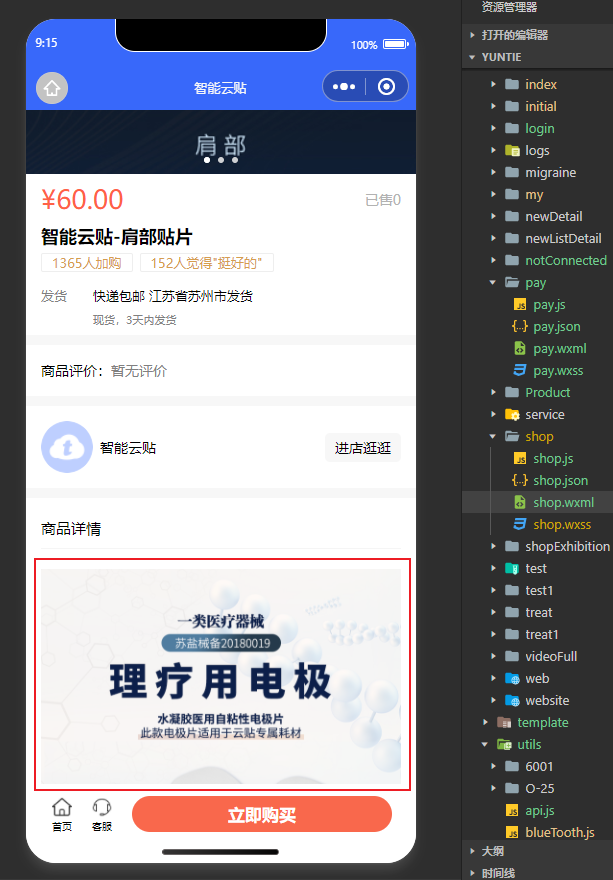
代码:
wxml
<!--商品详情-->
<view class='details_box'>
  <view style="height:40px;line-height: 40px;border-bottom:1px solid #f5f5f5;font-size: 30rpx;font-weight: 500;">
    <view>商品详情</view>
  </view>
  <view style='padding:10px 0px;'>
    <view class="wxParse">
        <rich-text nodes="{{shopArr.content}}"  data-nodes="{{shopArr.content}}" space="ensp" bind:tap="showImg"></rich-text>
    </view>
  </view>
</view>
/**
   * 生命周期函数--监听页面加载
   */
  onLoad: function (options) {
    let that = this;
    this.setData({
      shop_id:options.shop_id
    })
    wx.showLoading({
      title: '加载中...',
    })
    app.wxRequest('POST', app.apiData.shop_index, {id:options.shop_id}, (r) => {
      console.log(r)
      wx.hideLoading()
      if(!r.code){
        wx.showToast({
          title: r.msg,
          icon:'error',
        })
        return;
      }
      var data = r.data;
				data.content = that.formatRichText(data.content);
      that.setData({
        shopArr:r.data
      })

    })
  },
 //富文本图片点击预览
  showImg(e) {
    let contentimg = e.target.dataset.nodes;
    let imgs = contentimg.match(/<img[^>]+>/g); //把img所有节点的图片选择出来
    let arrImg = [];
    //遍历标签拼拿到你的图片的src里面的内容放在我们数组中
    for (var j = 0; j < imgs.length; j++) {
      imgs[j].replace(/<img[^>]*src=['"]([^'"]+)[^>]*>/gi, function(match, capture) {
        arrImg.push(capture)
      })
    }
    //最后一步就是把我们的所有图片放在预览的api中就可以了
    wx.previewImage({
      current: arrImg,
      urls: arrImg,
    })
  },
  //富文本内容处理
  formatRichText(html) {
    let newContent = html.replace(/<img[^>]*>/gi, function(match, capture) {
      match = match.replace(/style="[^"]+"/gi, '').replace(/style='[^']+'/gi, '');
      match = match.replace(/width="[^"]+"/gi, '').replace(/width='[^']+'/gi, '');
      match = match.replace(/height="[^"]+"/gi, '').replace(/height='[^']+'/gi, '');
      return match;
    });
    newContent = newContent.replace(/style="[^"]+"/gi, function(match, capture) {
      match = match.replace(/width:[^;]+;/gi, 'max-width:100%;').replace(/width:[^;]+;/gi,
        'max-width:100%;');
      return match;
    });
    newContent = newContent.replace(/<br[^>]*\/>/gi, '');
    newContent = newContent.replace(/\<img/gi,
      '<img style="max-width:100%;height:auto;display:block;margin:10px 0;"');
    return newContent;
  },