

uniapp生成海报
插件
<template>
	<view class="canvas">
		<canvas canvas-id="myCanvas" :style="{width: width+'px',height: height+'px'}"></canvas>
	</view>
</template>
<!--
list参数说明:
 图片渲染:
 type: 'image',
 x: X轴位置,
 y: Y轴位置,
 path: 图片路径,
 width: 图片宽度,
 height: 图片高度,
 rotate: 旋转角度
 shape: 形状,默认无,可选值:circle 圆形
 area: {x,y,width,height}  // 绘制范围,超出该范围会被剪裁掉 该属性与shape暂时无法同时使用,area存在时,shape失效

 文字渲染:
 type: 'text',
 x: X轴位置,
 y: Y轴位置,
 text: 文本内容,
 size: 字体大小,
 textBaseline: 基线 默认top  可选值:'top'、'bottom'、'middle'、'normal'
 color: 颜色

 多行文字渲染:
 type: 'textarea',
 x: X轴位置,
 y: Y轴位置,
 width:换行的宽度
 height: 高度,溢出会展示“...”
 lineSpace: 行间距
 text: 文本内容,
 size: 字体大小,
 textBaseline: 基线 默认top  可选值:'top'、'bottom'、'middle'、'normal'
 color: 颜色
 -->
<script>
	export default {
		name: "Poster",
		props: {
			// 绘制队列
			list: {
				type: Array,
				required: true
			},
			width: {
				type: Number,
				required: true
			},
			height: {
				type: Number,
				required: true
			},
			backgroundColor: {
				type: String,
				default: 'rgba(0,0,0,0)'
			}
		},
		emit: ['on-success', 'on-error'],
		data() {
			return {
				posterUrl: '',
				ctx: null, //画布上下文
				counter: -1, //计数器
				drawPathQueue: [], //画图路径队列
			};
		},
		computed: {
			// 渲染列表中图片的数量
			imgCount() {
				return this.list.filter(item => item.type == 'image').length;
			},
			successImageCount() {
				return this.drawPathQueue.filter(item => item.type == 'image' && item.success).length;
			}
		},
		watch: {
			drawPathQueue: {
				handler(newVal, oldVal) {
					// 总图片数量不为零 并且 加载图片数量与总图片数量不相等,不进行绘制
					// 没图片或图片都加载完成了,开始绘制
					console.log(this.imgCount, this.successImageCount)
					if (!this.imgCount && newVal != this.imgCount) {
						return;
					}
					// 绘制单行文字
					const fillText = (textOptions) => {
						this.ctx.setFillStyle(textOptions.color)
						this.ctx.setFontSize(textOptions.size)
						this.ctx.setTextBaseline(textOptions.textBaseline || 'top')
						this.ctx.fillText(textOptions.text, textOptions.x, textOptions.y)
					}
					// 绘制段落
					const fillParagraph = (textOptions) => {
						this.ctx.setFontSize(textOptions.size)
						let tempOptions = JSON.parse(JSON.stringify(textOptions));
						// 如果没有指定行间距则设置默认值
						tempOptions.lineSpace = tempOptions.lineSpace ? tempOptions.lineSpace : 10;
						// 获取字符串
						let str = textOptions.text;
						// 计算指定高度可以输出的最大行数
						let lineCount = Math.floor((tempOptions.height || this.height + tempOptions.lineSpace) / (
							tempOptions.size +
							tempOptions.lineSpace))
						// 初始化单行宽度
						let lineWidth = 0;
						let lastSubStrIndex = 0; //每次开始截取的字符串的索引

						// 构建一个打印数组
						let strArr = str.split("");
						let drawArr = [];
						let text = "";
						while (strArr.length) {
							let word = strArr.shift()
							text += word;
							let textWidth = this.ctx.measureText(text).width;
							if (textWidth > textOptions.width) {
								// 因为超出宽度 所以要截取掉最后一个字符
								text = text.substr(0, text.length - 1)
								drawArr.push(text)
								text = "";
								// 最后一个字还给strArr
								strArr.unshift(word)
							} else if (!strArr.length) {
								drawArr.push(text)
							}
						}

						if (drawArr.length > lineCount) {
							// 超出最大行数
							drawArr.length = lineCount;
							let pointWidth = this.ctx.measureText('...').width;
							let wordWidth = 0;
							let wordArr = drawArr[drawArr.length - 1].split("");
							let words = '';
							while (pointWidth > wordWidth) {
								words += wordArr.pop();
								wordWidth = this.ctx.measureText(words).width
							}
							drawArr[drawArr.length - 1] = wordArr.join('') + '...';
						}
						// 打印
						// 记录初始y值
						const y = tempOptions.y;
						for (let i = 0; i < drawArr.length; i++) {
							tempOptions.y = y + tempOptions.size * i + tempOptions.lineSpace * i; // y的位置
							tempOptions.text = drawArr[i]; // 绘制的文本
							fillText(tempOptions)
						}
					}
					// 绘制背景
					this.ctx.setFillStyle(this.backgroundColor);
					this.ctx.fillRect(0, 0, this.width, this.height);
					/* 所有元素入队则开始绘制 */
					if (this.drawPathQueue.length === this.list.length) {
						try {
							// console.log('生成的队列:' + JSON.stringify(this.drawPathQueue));
							console.log('开始绘制...')
							for (let i = 0; i < this.drawPathQueue.length; i++) {
								for (let j = 0; j < this.drawPathQueue.length; j++) {
									let current = this.drawPathQueue[j]
									/* 按顺序绘制 */
									if (current.index === i) {
										/* 文本绘制 */
										if (current.type === 'text') {
											console.log('绘制文本:' + current.text);
											fillText(current)
											this.counter--
										}
										/* 多行文本 */
										if (current.type === 'textarea') {
											console.log('绘制段落:' + current.text);
											fillParagraph(current)
											this.counter--
										}
										/* 图片绘制 */
										if (current.type === 'image') {
											console.log('绘制图片:' + current.path);
											if (current.area) {
												// 绘制绘图区域
												this.ctx.save()
												this.ctx.beginPath(); //开始绘制
												this.ctx.rect(current.area.x, current.area.y, current.area.width, current
													.area
													.height)
												this.ctx.clip();
												// 设置旋转中心
												let offsetX = current.x + Number(current.width) / 2;
												let offsetY = current.y + Number(current.height) / 2;
												this.ctx.translate(offsetX, offsetY)
												let degrees = current.rotate ? Number(current.rotate) % 360 : 0;
												this.ctx.rotate(degrees * Math.PI / 180)
												this.ctx.drawImage(current.path, current.x - offsetX, current.y - offsetY,
													current.width, current.height)
												this.ctx.closePath();
												this.ctx.restore(); // 恢复之前保存的上下文
											} else if (current.shape == 'circle') {
												this.ctx.save(); // 保存上下文,绘制后恢复
												this.ctx.beginPath(); //开始绘制
												//先画个圆   前两个参数确定了圆心 (x,y) 坐标  第三个参数是圆的半径  四参数是绘图方向  默认是false,即顺时针
												let width = (current.width / 2 + current.x);
												let height = (current.height / 2 + current.y);
												let r = current.width / 2;
												this.ctx.arc(width, height, r, 0, Math.PI * 2);
												//画好了圆 剪切  原始画布中剪切任意形状和尺寸。一旦剪切了某个区域,则所有之后的绘图都会被限制在被剪切的区域内 这也是我们要save上下文的原因
												this.ctx.clip();
												// 设置旋转中心
												let offsetX = current.x + Number(current.width) / 2;
												let offsetY = current.y + Number(current.height) / 2;
												this.ctx.translate(offsetX, offsetY)
												let degrees = current.rotate ? Number(current.rotate) % 360 : 0;
												this.ctx.rotate(degrees * Math.PI / 180)
												this.ctx.drawImage(current.path, current.x - offsetX, current.y - offsetY,
													current.width, current.height)
												this.ctx.closePath();
												this.ctx.restore(); // 恢复之前保存的上下文
											} else {
												this.ctx.drawImage(current.path, current.x, current.y, current.width,
													current
													.height)
											}
											this.counter--
										}
									}
								}
							}
						} catch (err) {
							console.log(err)
							this.$emit('on-error', err)
						}
					}
				},
				deep: true
			},
			counter(newVal, oldVal) {
				if (newVal === 0) {
					/* draw完不能立刻转存,需要等待一段时间 */
					// draw回调的正确用法。。。。 一定要仔细看文档啊
					this.ctx.draw(false, () => {
						console.log('final counter', this.counter);
						uni.canvasToTempFilePath({
							canvasId: 'myCanvas',
							success: (res) => {
								console.log('in canvasToTempFilePath');
								// 在H5平台下,tempFilePath 为 base64
								// console.log('图片已保存至本地:', res.tempFilePath)
								this.posterUrl = res.tempFilePath;
								this.$emit('on-success', res.tempFilePath)
							},
							fail: (res) => {
								console.log(res)
							}
						}, this)
					})
				}
			}
		},
		mounted() {
			this.ctx = uni.createCanvasContext('myCanvas', this)
			// this.generateImg()
			console.log('mounted')
		},

		methods: {
			create() {
				this.generateImg()
			},
			generateImg() {
				console.log('generateimg')
				this.counter = this.list.length
				this.drawPathQueue = []
				/* 将图片路径取出放入绘图队列 */
				for (let i = 0; i < this.list.length; i++) {
					console.log('for', i)
					let current = this.list[i]
					current.index = i
					/* 如果是文本直接放入队列 */
					if (current.type === 'text' || current.type === 'textarea') {
						this.drawPathQueue.push(current)
						continue
					}
					/* 图片需获取本地缓存path放入队列 */
					uni.getImageInfo({
						src: current.path,
						success: (res) => {
							current.path = res.path;
							current.success = true; // 表示加载完成
							this.drawPathQueue.push(current)
						},
						fail: (err) => {
							console.error(err)
						}
					})
				}
			},
			saveImg() {
				uni.canvasToTempFilePath({
					canvasId: 'myCanvas',
					success: (res) => {
						// 在H5平台下,tempFilePath 为 base64
						uni.saveImageToPhotosAlbum({
							filePath: res.tempFilePath,
							success: () => {
								console.log('save success');
							}
						});
					}
				})
			}
		}
	}
</script>

<style lang="scss" scoped>
	.canvas {
		position: fixed;
		top: 100rpx;
		left: 750rpx;
	}
</style>
使用
<template>
	<view>
		<view class="integralAll">
			<image src="/static/images/14.png" class="bgImg" mode="aspectFill"></image>
			<view class="">
				<view class="integralText">
					<view style="font-size: 47rpx;">当前余额</view>
					<!-- 保留两位小数 -->
					<view class="title">{{formattedNumber}}</view>
				</view>
			</view>
			<view class="exchange">
				<image src="/static/images/tixing.png" mode=""></image>
				<button @click="myDistribution()">立即提现</button>
			</view>
			<!-- 收益 -->
			<view class="profit">
				<view class="profitList">
					<view class="">昨日收益</view>
					<view class="">{{profitNumber}}</view>
				</view>
				<view class="profitList">
					<view class="">累计已提</view>
					<view class="">{{profitseNumber}}</view>
				</view>
			</view>
		</view>
		<view class="share">
			<view class="shareList" @click="start">
				<image src="/static/images/27.png" mode=""></image>
				<view class="">分享二维码</view>
			</view>
			<view class="shareList">
				<image src="/static/images/45.png" mode=""></image>
				<view class="">推广人统计</view>
			</view>
			<view class="shareList">
				<image src="/static/images/28.png" mode=""></image>
				<view class="">佣金明细</view>
			</view>
			<view class="shareList">
				<image src="/static/images/48.png" mode=""></image>
				<view class="">提现明细</view>
			</view>
		</view>
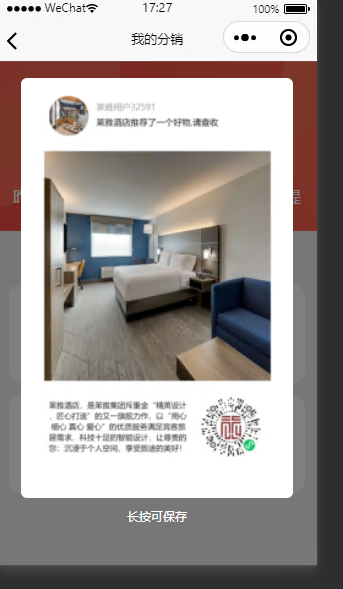
		<view style="position: absolute;top: 0;height: 100%;width: 100%;" v-if="poster&&showPlacard" @click.stop="hidePlacard()">
			<view style="width:100%;height: 100%;background-color: rgba(000, 000, 000, 0.5);position: absolute;z-index: 99;"></view>
			<view style="display: flex;justify-content: center;align-items: center;width: 90%;height: 90%;margin: 0 auto;">
				<view style="width: 90%;height: 90%;background-color: white;position: relative;z-index: 100;border-radius: 15rpx;padding: 15rpx;">
					<image :src="poster" mode="aspectFit" style="width: 100%;height: 100%;" @longpress.stop="saveSharePic"></image>
					<view style="text-align: center;font-size: 30rpx;color: white;position: relative;top: 30rpx;">长按可保存</view>
				</view>
			</view>
		</view>
		<poster ref="poster" :list="list" background-color="#FFF" :width="750" :height="1334" @on-success="posterSuccess" @on-error="posterError"></poster>
	</view>
</template>

<script>
	import Poster from '@/components/zhangyuhao-poster/Poster.vue'
	export default {
		components: {
		   Poster
		},
		data() {
			return {
				number: 0.00,
				profitNumber:0.00,
				profitseNumber:0.00,
				poster: '',//海报
				showPlacard:false,//是否显示海报
				list: [],
				userInfo:[],
			}
		},
		computed: {
		   formattedNumber() {
		     return this.number.toFixed(2);
		     return this.profitNumber.toFixed(2);
		     return this.profitseNumber.toFixed(2);
		   },
		 },
		 onLoad() {
		 	this.getData();
		 },
		methods: {
			getData(){
				let that = this;
				uni.showLoading({
					title:'加载中...'
				})
				that.$request('/wxqrcode/qrcode', {}).then(res => {
					let data = res.data;
					if(res.code==1){
						that.userInfo = data;
					}
					uni.hideNavigationBarLoading();
					uni.stopPullDownRefresh();
					uni.hideLoading();
				});
			},
			// 我的分销
			myDistribution(){
				uni.navigateTo({
					url:'/pages/user/myDistribution'
				})
			},
			// 分享生成海报
			generatePoster() {
				// 调用 PosterGenerator 组件中的 generatePoster 方法
				console.log(this.$refs)
				// 生成图片

				this.$refs.posterGenerator.getData();
			},
			posterError(err) {
				console.log(err)
				uni.hideLoading();
				uni.showToast({
					title:'生成失败',
					icon:'fail'
				})
			},
			posterSuccess(url) {
				// 生成成功,会把临时路径在这里返回
				this.poster = url;
				this.showPlacard = true;
				uni.hideLoading();
				console.log(url)
			},
			//关闭海报显示
			hidePlacard(){
				this.showPlacard = false;
			},
			start() {
				let userInfo = this.userInfo;
				if(this.poster){
					this.showPlacard = true;
					return;
				}
				uni.showLoading({
					title:'生成中...'
				})
				// 赋值需要渲染的信息
				this.list = [
					{
						type: 'image',
						path: userInfo.avatar,
						x: 20,
						y: 40,
						width: 130,
						height: 130,
						shape:'circle'
					},
					{
						type: 'text',
						size: 28,
						color:'#A7A7A7',
						x: 175,
						y: 65,
						text:userInfo.nickname,
						width: 100,
						height: 100,
					},
					{
						type: 'text',
						size: 28,
						color:'#000000',
						x: 175,
						y: 115,
						text:userInfo.tip,
						width: 100,
						height: 100,
					},
					{
						type: 'image',
						// path替换成你自己的图片,注意需要在小程序开发设置中配置域名
						path: userInfo.cover,
						x: 5,
						y: 220,
						width: 740,
						height: 750,
						textBaseline:'bottom'
					},
					{
						type: 'textarea',
						width: 450,
						height: 200,
						x: 20,
						y: 1040,
						text: userInfo.introduce,
						size: 25,
						color: '#000'
					},
					{
						type: 'image',
						path: userInfo.wxqrcode,
						x: (750+280) / 2,
						y: 1020,
						width: 200,
						height: 200
					},

				];
				// 生成图片
				this.$nextTick(() => {
					// 要放在$nextTick()里,不然会空白
					this.$refs.poster.create();
				})
			},
			// 长按保存生成的海报
			saveSharePic() {
				var that=this;
				uni.showModal({
					title: '提示',
					content: '确定要保存分享海报吗?',
					success: function(res) {
						if (res.confirm) {
							console.log('确认')
							// canvas生成图片
							// 保存到本地
							uni.saveImageToPhotosAlbum({
								filePath: that.poster,
								success: function() {
									uni.showToast({
										title: '保存海报成功',
										icon: 'none',
										duration: 3000
									});
								},
								fail: function() {
									uni.showToast({
										title: '保存海报失败',
										icon: 'none',
										duration: 3000
									});
								}
							});
						}
					}
				});
			},
		}
	}
</script>
<style>
	page{
		background: #efefef;
	}
</style>
<style scoped>
	.share{
		width: 100%;
		padding: 30rpx;
		box-sizing: border-box;
		margin-top: 100rpx;
		display: flex;
		justify-content: space-between;
		flex-wrap: wrap;
	}
	.shareList{
		width: 310rpx;
		height: 230rpx;
		background: white;
		display: flex;
		justify-content: center;
		align-items: center;
		flex-direction: column;
		border-radius: 30rpx;
		color: #999999;
		margin-bottom: 30rpx;
	}
	.shareList image{
		width: 81rpx;
		height: 91rpx;
		margin-bottom: 37rpx;
	}


	/* 昨日收益 */
	.profit{
		width: 100%;
		height: 120rpx;
		display: flex;
		justify-content: space-between;
		align-items: center;
		position: absolute;
		bottom: 0;
	}
	.profitList{
		width: 30%;
		text-align: center;
		line-height: 50rpx;
		color: white;
	}


	/* 立即兑换 */
	.exchange{
		width: 100%;
		position: absolute;
		bottom: -30rpx;
		/* left: 28%; */
		text-align: center;
	}
	.exchange image{
		width: 340rpx;
		height: 70rpx;
		position: relative;
	}
	.exchange button{
		width: 240rpx;
		height: 65rpx;
		line-height: 65rpx;
		margin: 0;
		padding: 0;
		position: absolute;
		top: 15rpx;
		left: 34%;
		background: #f95a47;
		border-radius: 50rpx;
		font-size: 25rpx;
		color: white;
		margin-top: 20rpx;
	}

	/* 背景 */
	.integralAll{
		width: 100%;
		height: 400rpx;
		background: white;
		position: relative;
		top: 0;
	}
	.bgImg{
		width: 100%;
		height: 100%;

	}
	/* 积分文字 */
	.integralText{
		width: 100%;
		height: 400rpx;
		display: flex;
		align-items: center;
		justify-content: center;
		flex-direction: column;
		color: white;
		position: absolute;
		top: 0;
		z-index: 0;
		font-size: 30rpx;
	}
	.title{
		font-size: 50rpx;
		margin-top: 10rpx;
		font-size: 85rpx;
	}

</style>
原创文章,转载请注明:uniapp生成海报 | 知识改变命运
转载请注明出处: 知识改变命运 » uniapp生成海报
